Your cart is currently empty.
Go to cartangelicvibes / support
how can we help?
try:24 answers · 6 categories
answers without the runaround
common questions.
6 answers to get you started
where are my purchased downloads?
accounts & downloads
sign in and open my downloads in your account. purchases are available after payment; orders on hold cannot be downloaded.
how do i get back into my account?
accounts & downloads
use lost your password? on the account sign-in page. for help with account access, contact support with the email linked to your account.
do i need an account for free downloads?
accounts & downloads
yes. create a free account or sign in to access the free downloads. the account step helps protect the download archive from bots.
what should i check when a download will not start?
accounts & downloads
confirm you are signed in, then check whether your browser is blocking downloads or popups for angelicvibes. purchased files are in your account under my downloads.
my plugin is installed. why is it not showing up?
plugins & installation
check installation, restart your computer, and rescan your daw. also check the effects/instrument category, publisher name, and compatibility.
where do au and vst3 files go on mac?
plugins & installation
use the supplied installer first. for manual installation, close your daw and copy each file to its matching folder:
vst3
/Library/Audio/Plug-Ins/VST3au
/Library/Audio/Plug-Ins/Componentsreopen the daw and rescan if needed.
where do vst3 files go on windows?
plugins & installation
use the supplied installer first. for a manual install, close your daw and copy the .vst3 file here:
vst3
C:\Program Files\Common Files\VST3reopen your daw and rescan. older .dll plugins use a separate vst folder.
how do i update pitchshifter?
plugins & installation
download pitchshifter again and run the installer. open your daw, rescan plugins, and load it on an effects channel.
where is my astrx license key?
activation & licenses
sign in to your account and open the licenses tab. copy the key for astrx synth.
how do i activate astrx?
activation & licenses
open astrx, enter your license key and the email connected to your account, then select activate.
does astrx need an internet connection after activation?
activation & licenses
no. once astrx is activated, its manual says an internet connection is no longer needed.
where can i deactivate astrx?
activation & licenses
the astrx main menu includes activate and deactivate buttons for managing its license.
how do i add my serum presets?
samples & presets
in serum, open its menu and choose the preset-folder option. put your downloaded preset folder inside presets → user, then rescan folders from serum’s menu.
the linked guide covers serum 1 and serum 2.
what about serum skins, samples, or lfo files?
samples & presets
open the serum presets folder from its menu. place each file in the matching folder—such as skins, samples, or lfo shapes—then rescan.
why are my new omnisphere patches missing?
samples & presets
check the installation, then use the refresh button beneath the patches browser.
my pack will not unzip. what should i send support?
samples & presets
send the file name and a screenshot of the extraction error through the contact page.
can i pay by debit or credit card?
why are downloads unavailable for an on-hold order?
orders & payments
on-hold orders do not unlock downloads. contact support about the order.
what is the digital-product refund policy?
orders & payments
refunds are generally unavailable. the faq lists exceptions for a completely non-working product, duplicate purchases of the same product, and fraudulent purchases.
does a later sale qualify for a refund?
orders & payments
no. the terms state that later price adjustments, discounts, or promotions do not qualify for refunds.
can i release music made with these sounds?
usage & licensing
yes. the license allows original commercial and non-commercial music, including beat sales, streaming releases, and placements. angelicvibes does not collect royalties.
the license is non-exclusive. see the full agreement for restrictions.
am i buying ownership of the sounds?
usage & licensing
no. you receive a non-exclusive, single-user license to use them in your music. angelicvibes retains ownership of the original product content.
can i turn these sounds into another sample pack?
usage & licensing
no. repackaging or redistributing the sounds as another sample pack is not permitted by the user agreement.
can free or paid products be used for ai training?
usage & licensing
no. the agreement prohibits ai training, machine learning, and training datasets using free or paid content. editing the content does not remove this restriction.
no answers found.
try a product name or a shorter phrase. support is here when a question needs a closer look.
looking for something else?
go a little deeper
all guidesguides & walkthroughs.
product manuals.
straight to the details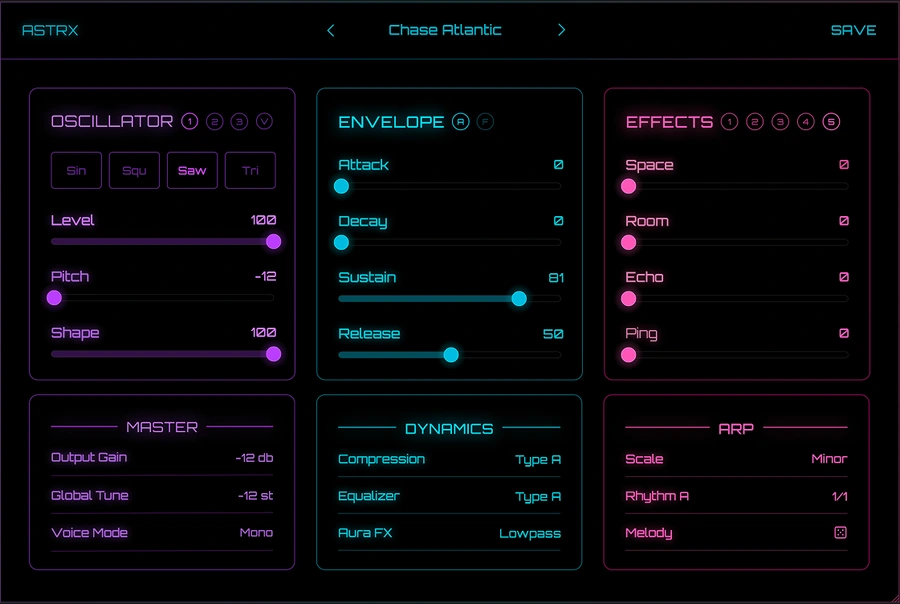
something else?
still need a hand?
send the product name and a short description of the issue. for plugin questions, include your operating system, daw, and a screenshot.
contact supportopens the angelicvibes contact page