Your cart is currently empty.
Go to cart
Welcome back
Log in to your account
New here?
Create account
←
New accountCreate your account
Your selection
Cart
serum 1 + serum 2
how to install serum presets.
A quick guide for adding Serum presets, skins, samples, LFO shapes, and other Serum files to the right folder on your computer.
installing serum presets.
This method works for both Serum 1 and Serum 2. The easiest way to find the correct folder is to open it directly from inside Serum.
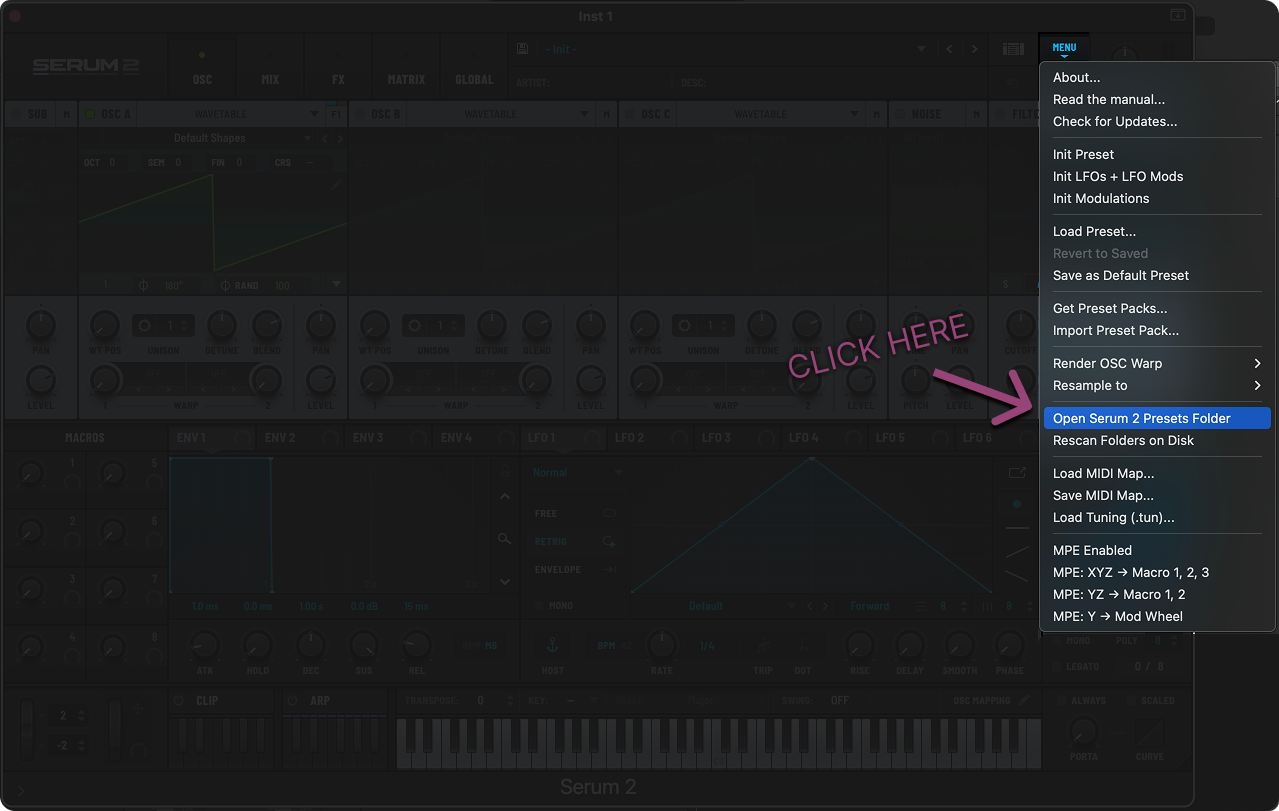
In Serum's menu, choose Open Serum Presets Folder to jump straight to the correct folder on your computer.
- Open Serum. Launch Serum inside your DAW, then click the menu button in the top area of the plugin.
- Open the presets folder. In the menu, click Open Serum Presets Folder. This opens the Serum folder location on your computer.
- Find the User presets folder. Inside the Serum folder, you will see folders like LFO Shapes, Skins, Samples, and Presets. For presets, open Presets, then open User.
- Drop in your presets. Place your preset files or full preset folders inside the User folder.
- Rescan Serum. Go back to Serum, open the menu again, and click Rescan folders on disk. Your new presets should now appear in Serum.
If you have Serum skins, samples, LFO shapes, or other Serum files, the process is the same: open the Serum presets folder from the menu, place the files inside the matching folder, then rescan folders on disk.
need serum presets?
Start with our free Serum presets, or grab the full AngelicVibes Serum bundle if you want a larger collection of sounds.
smart coupon
accept offer